

Using AI Tools to Write miniSMU and µSMU Scripts
Learn how to use AI assistants like Claude, ChatGPT, and Gemini to write Python automation scripts for miniSMU and µSMU source measure units. Includes ready-to-use context templates and working code examples for solar cells, batteries, LEDs, and more.
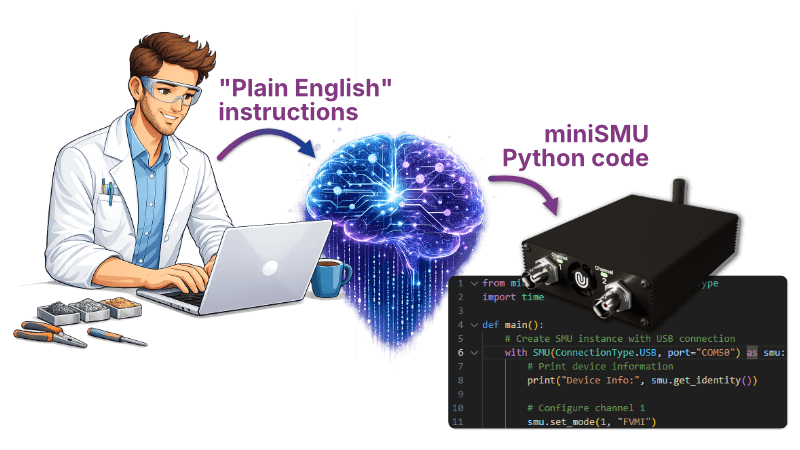
If you're a photovoltaic researcher, battery scientist, materials engineer, or student who knows exactly what measurements you need but isn't comfortable writing Python from scratch, AI coding assistants can help. Tools like Claude, ChatGPT, and Gemini let you describe your experiment in plain English and get working code back. No programming experience required.
The catch? These tools are trained on vast amounts of code, but they may not know the specifics of the miniSMU or µSMU Python libraries. This guide solves that with ready-to-use context templates that teach your AI tool everything it needs to know.
The key insight: AI tools work best when given context about the libraries they're working with.
Imagine trying to recall details of a book you read 10 years ago, compared to one you have in front of you for reference. This is similar to knowledge learned during AI model training versus knowledge in its "context window".
This guide provides ready-to-use context templates that help AI assistants write correct, working code for your miniSMU or µSMU.
What's a Context Template?
A context template is a reference document that describes a library's API, common patterns, and important gotchas. When you give one to an AI assistant, it's like handing a colleague a cheat sheet before asking them for help - they'll produce much better results.
We maintain context templates for both of our Python libraries. You use them by:
- Pasting at the start of a conversation with any AI assistant
- Saving as a file in your project folder (
CLAUDE.mdfor Claude Code,AGENTS.mdfor Copilot/Codex) so the AI picks it up automatically - Adding to your system prompt or custom instructions
Get the Templates
miniSMU
The miniSMU MS01 template covers dual-channel operation, USB and WiFi connectivity, hardware I-V sweeps, current range control, 4-wire Kelvin sensing, and data streaming.
Get the template: View on GitHub - click "Raw" then copy all
µSMU
The µSMU template covers USB serial connection, output control, voltage/current measurement, current limiting, and software-based I-V sweeps.
Get the template: View on GitHub - click "Raw" then copy all
Getting Started
- Copy the template from the link above (click "Raw", select all, copy)
- Paste it at the start of your conversation with any AI tool
- Describe your measurement in plain English
- Iterate - ask the AI to modify, add features, or fix issues
Start simple. Ask for a basic script that connects and takes one measurement. Once that works, ask the AI to add a sweep, then CSV export, then a plot. Building up in steps is more reliable than asking for everything at once, and you'll understand the code better as it grows.
A few things that help the AI give you better results:
- Mention your operating system and COM port (e.g. "I'm on Windows, the device is on COM3")
- Specify expected current ranges for your device under test
- Say what output format you want (CSV, matplotlib plot, printed to console)
- Ask for safety features: "Add protection limits and make sure the output is disabled if an error occurs"
Example Prompts and Generated Code
To give you a sense of what this workflow looks like in practice, here are some real prompts and the kind of code an AI assistant will produce.
Solar Cell I-V Characterisation
"Write a Python script for the miniSMU MS01 that measures the I-V curve of a solar cell from -0.2V to 0.8V with 101 points. Calculate and print Voc, Isc, fill factor, and efficiency assuming 100 mW/cm² illumination and a 1 cm² cell area. Save the data to a CSV file."
LED Testing with Safety Cutoff
"Create a script for the miniSMU that sweeps voltage from 0 to 3.5V on an LED. Stop immediately if current exceeds 15mA to protect the LED. Plot the I-V curve when done."
Li-Ion Battery Charge/Discharge Cycle
"Write a script that performs a full Li-Ion battery charge and discharge cycle at 100mA. Include CC charge to 4.2V, CV hold until current drops to 10mA, a 5-minute rest, CC discharge to 3.0V, and another rest. Log all data with timestamps to a CSV."
Batch Sample Testing
"I need to test multiple samples. Write a script that loops: asks for sample ID, runs an I-V sweep from -1V to 1V, saves as 'sample_[ID].csv', and asks if I want to continue."
Resistance Monitoring Over Time
"Write a script that monitors resistance by forcing 1mA and measuring voltage. Take a reading every second for 5 minutes and show a live-updating plot."
When Things Go Wrong
If the AI gives you code that doesn't run, don't worry! This is a normal (although increasingly less so) part of the process. Copy the error message, paste it back, and ask the AI to fix it. It will usually spot the problem immediately.
A few common issues and quick fixes:
"Module not found" - Install the library first:
pip install minismu-py  # For miniSMU
pip install usmu-py      # For µSMU
Can't find the device - Ask the AI: "Add code to list available serial ports so I can find my device"
Unexpected readings - Ask: "Add appropriate protection limits and explain what each setting does"
It's worth noting that the Python libraries use exactly the same hardware commands as the miniSMU desktop app - measurement accuracy is identical regardless of how you control the device. The AI is just helping you write the code; it doesn't affect the electrical measurements themselves.
Further Reading
- Kelvin Connections for Solar Cell I-V Testing - Using 4-wire measurements for accurate characterisation
- How to Update Your miniSMU Firmware - Get the latest features including hardware sweeps and Kelvin sensing
- miniSMU Python Library - Full source and documentation
- µSMU Python Library - Full source and documentation
Found something missing from the templates, or have a useful code pattern to share? The CLAUDE.md and AGENTS.md files in each repository are the source of truth - pull requests are welcome.