

SweepMe! Driver
Drive miniSMU from SweepMe! - the no-code measurement automation platform - and coordinate complex multi-instrument sequences without writing a line of code.
Supported Features
- •Full control of both SMU channels over USB or Wi-Fi
- •FVMI and FIMV modes with programmable voltage & current compliance
- •On-board I-V sweeps with up to 1000 points
- •Configurable oversampling (OSR 0–15) for noise reduction
Great For
- •Coordinating miniSMU with other lab instruments in one sequence
- •Photovoltaic, semiconductor, and electrochemical characterisation
- •Repeatable, automated measurement workflows - no scripting required
LabVIEW Driver
Integrate the miniSMU into your LabVIEW projects with our official instrument driver
What's Included
- •Driver VIs for initialization, output control (FVMI/FIMV), streaming, sweeps, and measurements
- •Ready-to-run example panels: Test Panel, Streaming, and Sweep examples
- •Type definitions for sweep config, streaming data, and JSON/CSV responses
- •Full API reference documentation (PDF)
Requirements
- •LabVIEW 2021 or newer
- •NI-VISA with USB support
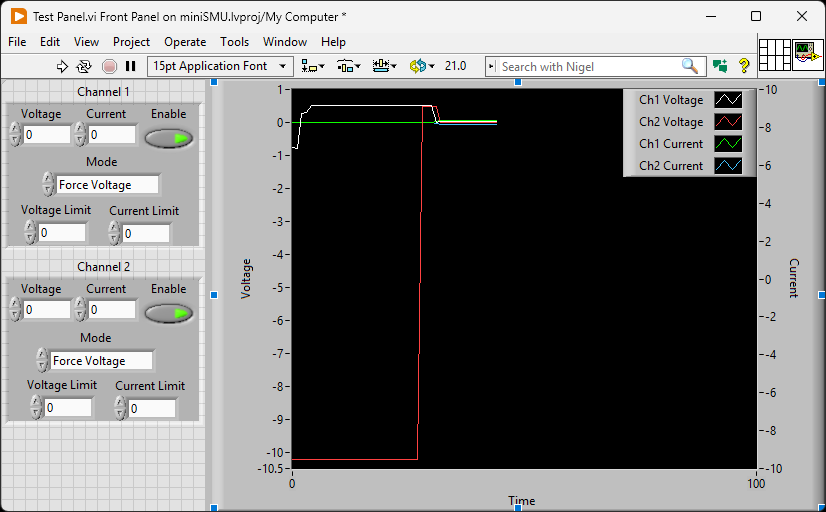
LabVIEW Test Panel for interactive control
Python Library
Full-featured Python library for automation and scripting
Key Features
- •USB and WiFi (TCP) connectivity
- •FVMI/FIMV modes with protection limits
- •Hardware-accelerated onboard I-V sweeps
- •Real-time data streaming
- •WiFi network scanning and auto-connect
- •4-wire Kelvin sensing for high-accuracy measurements
Installation
$ pip install minismu-pyQuick Start Example
from minismu_py import SMU, ConnectionType

# Connect via USB
with SMU(ConnectionType.USB, port="COM3") as smu:
    print(f"Connected: {smu.get_identity()}")

    # Configure for voltage sourcing
    smu.set_mode(1, "FVMI")
    smu.set_voltage(1, 1.2)
    smu.enable_channel(1)

    # Measure
    v, i = smu.measure_voltage_and_current(1)
    print(f"{v:.3f}V, {i*1000:.3f}mA")
Includes examples for I-V sweeps, streaming, WiFi control, and more in the examples/ directory.